eSIM for iPad 2026: Which iPads Take One, and the 7 Best Plans Ranked
I compared iPad plans from seven travel eSIM providers and the three big US carriers on price per gigabyte, daily allowances and the small print. Here’s which eSIM for iPad to buy, and the iPads that can’t take any of them.
November 5, 2026

At home in the US: AT&T’s Unlimited Day Pass, $3 for 24 hours, no AT&T account needed.
The catch: only Wi-Fi + Cellular iPads take an eSIM. No Cellular Data menu in Settings means no plan on this page will install.
The podium

Nomad
- 10GB for $16 before code
- 30-day plan validity
- QR and app installation
- New and returning users

aloSIM
- 50GB for longer stays
- $0.59 per GB after code
- 5GB week for $9.50
- Great for video calls

Maya Mobile
- 165+ countries covered
- Hotspot sharing included
- Single global eSIM profile
- Fair-use speed reductions
| Provider | Best iPad plan (Japan) | Price | With code | Code |
|---|---|---|---|---|
| Nomad | 20GB, 30 days | $23.00 | $19.55 | ESIMDUDE15 |
| aloSIM | 50GB, 30 days | $34.50 | $29.33 | ESIMTWEAKS |
| Maya Mobile | Unlimited, 7 days | $19.99 | $17.99 | ESIMTWEAKS10 |
| Airalo | 20GB, 30 days (Moshi Moshi) | $25.00 | $21.25 | ESIMADVICE15 |
| Ubigi | 10GB, 7 days | $14.00 | $12.60 | ESIMADVICE |
| Saily | Unlimited, 7 days (5GB a day) | $28.99 | $26.09 | ESIMDUDE |
| Holafly | Unlimited, 7 days | $27.50 | $27.50 | None |
All prices in US dollars. Japan is the benchmark: a common long-haul trip, with a Japan plan from every provider here.
Does iPad have eSIM? Which models take one
Every Wi-Fi + Cellular iPad from the 2018 iPad Pro onward supports eSIM, and the newest models support nothing else.
Wi-Fi-only iPads can’t take an eSIM at all, because the cellular radio was never fitted.
The five-second test: open Settings and look for a Cellular Data menu. No menu, no modem.
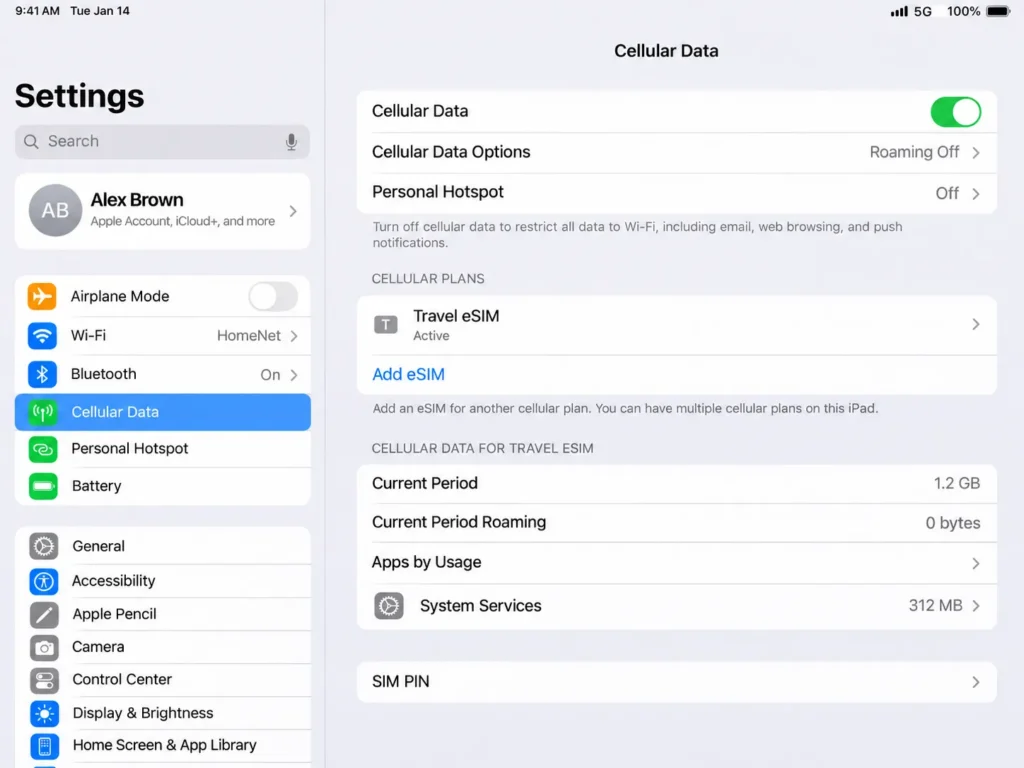
One trap catches phone people. The *#06# code that shows an EID on a phone does nothing here, because an iPad has no Phone app to dial it from.
Use the Settings test, or match the name under Settings > General > About with Apple’s iPad identifier.
| iPad model | eSIM on the Cellular version | Nano-SIM tray |
|---|---|---|
| iPad Pro 13-inch and 11-inch (M4, M5) | Yes | None, eSIM only |
| iPad Pro 11-inch, 1st to 4th generation | Yes | Yes |
| iPad Pro 12.9-inch, 3rd to 6th generation | Yes | Yes |
| iPad Air 13-inch and 11-inch (M2, M3, M4) | Yes | None, eSIM only |
| iPad Air, 3rd to 5th generation | Yes | Yes |
| iPad (A16), the 11th generation | Yes | None, eSIM only |
| iPad, 7th to 10th generation | Yes | Yes |
| iPad mini (A17 Pro) | Yes | None, eSIM only |
| iPad mini, 5th and 6th generation | Yes | Yes |
| Any Wi-Fi-only iPad | No | No |
On a current iPad Pro, iPad Air or iPad mini, there’s no tray, so the airport kiosk’s tourist SIM has nowhere to go. Older compatible Wi-Fi + Cellular iPads support both nano-SIM and eSIM, while newer cellular models are eSIM-only.
Still shopping for the iPad itself? Measure twice, cut once. The Wi-Fi box is cheaper on the shelf, and it can never be given a data plan later.
For other devices, run the eSIM compatibility check, and if the word profile is new, start with what an eSIM is.
Is there an eSIM for iPad Wi-Fi only models?
No. A Wi-Fi-only iPad has no cellular modem, so no eSIM, travel plan or carrier line will ever install on it. The two honest workarounds are tethering it to your phone or carrying a pocket hotspot.
Tether from your iPhone. Sign both devices into the same Apple Account and the iPhone appears in the iPad’s Wi-Fi list.
The catch: the phone’s plan pays for every megabyte, and travel plans often cap sharing. Holafly allows 1GB a day, pooled across the plan.
Carry a pocket hotspot. A small Wi-Fi router with its own SIM or eSIM serves the iPad, a laptop and a partner’s phone at once. It’s one more thing to charge, and to leave in a taxi.
Tether a lot? Pick the phone plan on its sharing rules. Unlimited data eSIMs differ most on hotspot terms.
The finding: an iPad has no phone number, so buy data only
An iPad eSIM is a data line with no phone number attached. FaceTime and iMessage run on your Apple Account rather than the SIM, so the cheapest data-only plan covers everything a tablet does.
On a phone, a data-only eSIM is a compromise. The home line stays on for bank codes and airline texts: two lines, two roaming toggles, one bill risk.
An iPad carries none of that baggage. To the network it’s a data-only subscriber: it can’t place a cellular call or receive a text on its own line, so a cheap plan strips out nothing.
That flips the usual buying logic. Bundled minutes and local numbers earn their keep on a phone, and buy nothing on a tablet.
The cheapest gigabyte is simply the cheapest gigabyte, so the rankings below lean hard on price per GB.
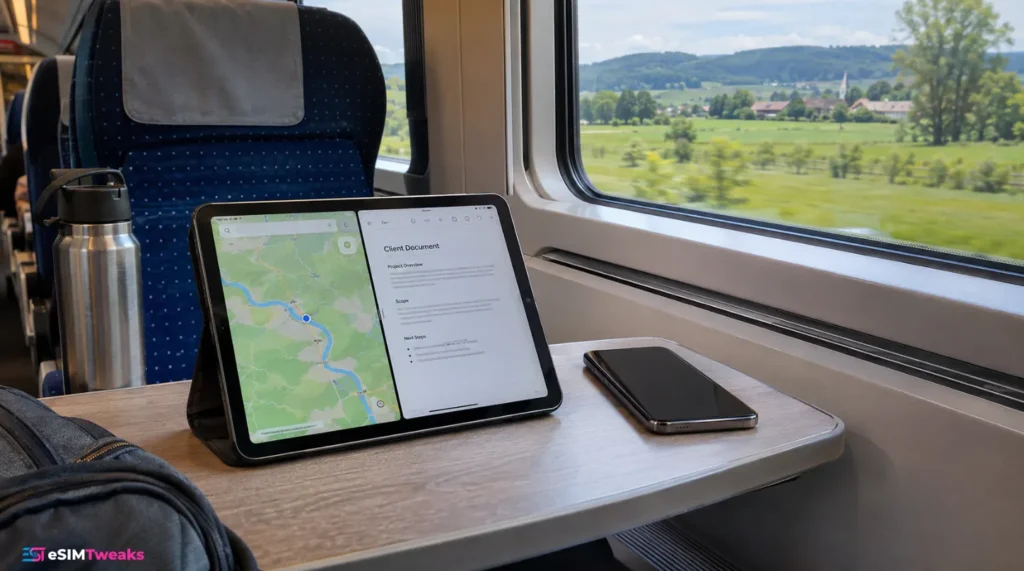
On long train rides, my iPad sits on the tray table, map on one half of the screen and a client document on the other, running its own cheap data plan.
The phone stays in my pocket on its home line, free for calls.
iPad cellular data plans at home: AT&T, Verizon and T-Mobile
At home, an iPad cellular data plan from a big US carrier costs $10 to $25 a month added to an eligible phone line, or $3 a day on AT&T’s day pass.
Without a phone line on the account, Verizon’s cheapest tablet plan jumps to $80.
That’s the home half of the iPad data plan question. In Chicago you need a line, a pass or nothing.
| Carrier and plan | Monthly price | Data | What you need first |
|---|---|---|---|
| AT&T Unlimited Day Pass | $3 per 24 hours | Unlimited for the day | Nothing: no AT&T account, card payment, first day free |
| Verizon Welcome | $10 ($20 without the discount) | 2GB, then 1 Mbps | Verizon phone line; $80 as a tablet-only account |
| Verizon Unlimited | $20 ($40 without the discount) | Unlimited, 15GB hotspot | Verizon phone line; $100 as a tablet-only account |
| Verizon Unlimited Plus | $25 ($50 without the discount) | Unlimited, 100GB hotspot | Verizon phone line; $110 as a tablet-only account |
| T-Mobile Tablet Essentials 2.0 | $15 | 5GB, then 600 kbps | T-Mobile voice line and AutoPay |
| T-Mobile Tablet Unlimited 2.0 | $20 | Unlimited | T-Mobile voice line and AutoPay |
| T-Mobile Tablet Unlimited Plus 2.0 | $25 | Unlimited, 15GB hotspot | T-Mobile voice line and AutoPay |
Before taxes and fees. Verizon’s 50% discount needs a phone on Unlimited Plus, Unlimited Ultimate or an eligible older plan. T-Mobile adds a $35 connection charge, and $5 a month without AutoPay.
Verizon’s tablet-only Welcome plan is $80 for 2GB. That’s $40 a gigabyte, for a plan that costs $10 beside an eligible phone line. Never open a Verizon tablet account on its own.
AT&T’s day pass changes the maths for occasional users. It launched in June 2026, you buy it in Settings > Cellular Data, and your first day is free.
At $3 a day it beats a $20 monthly line until you use it on 7 days in a month. Details are in AT&T’s announcement.
T-Mobile is the only one with real roaming baked into a tablet plan. Tablet Unlimited Plus 2.0 includes 5GB of high-speed data in 215+ countries and destinations, then 256 kbps. Tablet Unlimited 2.0 gives 5GB in Canada and Mexico, and 5GB then 128 kbps in 11 other countries.
Full terms: T-Mobile tablet plans and Verizon tablet plans. 5GB covers a week of maps and email, not a fortnight of video calls.
The roaming vs eSIM savings calculator runs your own numbers.
Which travel eSIM for iPad works abroad?
All seven providers ranked here install on eSIM-capable Wi-Fi + Cellular iPads, so the choice comes down to price and plan rules. Every plan is data-only, which suits a tablet perfectly.
None sells an iPad-only product: you install the same Japan plan a phone would get. Here’s a typical iPad trip to Japan after each code, sized for tablet use: about 5GB for a week of maps and email, 10GB for a fortnight with some video, 20GB for a month of work.
| Provider | 7 days, 5GB | 15 days, 10GB | 30 days, 20GB | Code |
|---|---|---|---|---|
| Nomad | $8.50 (30-day plan) | $13.60 (30-day plan) | $19.55, $0.98 a GB | ESIMDUDE15 |
| aloSIM | $8.08 | $15.30 | $21.25, $1.06 a GB | ESIMTWEAKS |
| Airalo | $8.50 | $14.88 | $21.25, $1.06 a GB | ESIMADVICE15 |
| Ubigi | $9.00 (15-day plan) | $14.85 (30-day plan) | $28.80 for 25GB, $1.15 a GB | ESIMADVICE |
| Saily | $9.89 (30-day plan) | $16.19 (30-day plan) | $22.49, $1.12 a GB | ESIMDUDE |
Airalo figures use the new-customer code. Existing customers pay $9.00, $15.75 and $22.50 with ESIMADVICE10.
For unlimited, the same trip lengths look like this.
| Provider | 7 days | 14 to 15 days | 30 days | Full-speed allowance |
|---|---|---|---|---|
| Maya Mobile | $17.99 | $25.19 (14 days) | $44.99 | About 3GB a day, then up to 10 Mbps |
| Nomad | $21.25 | $34.85 (14 days) | No 30-day plan | 2GB a day, then 1 Mbps |
| Ubigi | $22.50 (8 days) | $35.10 | $58.50 | 5GB a day; 30GB or 60GB per plan, then 2 Mbps |
| Airalo | $22.53 | $40.80 | $58.65 | 3GB a day, then 1 Mbps |
| Saily | $26.09 | $44.09 | $64.79 | 5GB a day, then 1 Mbps |
| Holafly | $27.50 | $50.50 | $73.90 | Unlimited, hotspot 1GB a day |
Holafly’s month costs $28.91 more than Maya’s, roughly 64% extra. Torn between big fixed data and unlimited? Try the eSIM data planner.
The 7 best eSIMs for iPad, ranked
Three winners, two contenders and two niche picks, ranked on price per gigabyte first, then daily allowances and activation windows.
1
Nomad
Nomad sells the cheapest one-off Japan month on this page at 10GB and 20GB: $16 and $23 over 30 days, or $13.60 and $19.55 with ESIMDUDE15. The code works for new and existing customers.
| Nomad Japan | Price | With ESIMDUDE15 | Per GB with code |
|---|---|---|---|
| 3GB, 30 days | $7.00 | $5.95 | $1.98 |
| 5GB, 30 days | $10.00 | $8.50 | $1.70 |
| 10GB, 30 days | $16.00 | $13.60 | $1.36 |
| 20GB, 30 days | $23.00 | $19.55 | $0.98 |
| 50GB, 30 days | $35.00 | $29.75 | $0.60 |
| Unlimited, 7 days | $25.00 | $21.25 | 2GB a day |
Every Japan plan from 3GB up runs 30 days, so a one-week trip keeps the spare weeks. That suits an iPad, which sits idle for days and then burns a gigabyte on one train ride.
Setup works by QR, app or manual SM-DP+ address, and new users get a free 1GB trial eSIM.
The weak spot is unlimited: 2GB a day at full speed, the smallest allowance here, and no 30-day option.
Verdict: the plan I’d put on most iPads. Take the 20GB. The Nomad review covers other regions.
15% off Nomad with ESIMDUDE15. New and existing customers, not on Sale plans. Japan 20GB, 30 days: 23.00 becomes 19.55.
2
aloSIM
aloSIM sells 50GB of Japan data over 30 days for $34.50, or $29.33 with ESIMTWEAKS. At $0.59 a gigabyte, it's the cheapest heavy-data month here, and its code gives 15% to everyone.
| aloSIM Japan | Price | With ESIMTWEAKS | Per GB with code |
|---|---|---|---|
| 5GB, 7 days | $9.50 | $8.08 | $1.62 |
| 10GB, 15 days | $18.00 | $15.30 | $1.53 |
| 20GB, 7 days | $22.00 | $18.70 | $0.94 |
| 20GB, 30 days | $25.00 | $21.25 | $1.06 |
| 50GB, 10 days | $27.50 | $23.38 | $0.47 |
| 50GB, 30 days | $34.50 | $29.33 | $0.59 |
Look at that ladder. 10GB costs $18 whether you take it for 15 days or 30, so never buy the shorter one. And 50GB over 30 days is only $8.08 more than 20GB after the code.
That last step is why aloSIM ranks second. An iPad doing flight streaming, cloud backups and video calls eats data faster than a phone, and 50GB for under $30 ends the meter-watching.
Verdict: best value for working on the iPad. Pick the local Japan plan, not the pricier Asia one. More in the aloSIM review.
15% off aloSIM with ESIMTWEAKS. Every customer, but not combined with aloCASH or vouchers. Japan 50GB, 30 days: 34.50 becomes 29.33.
3
Maya Mobile
Maya Mobile sells one unlimited plan for Japan and 165+ other countries: $19.99 for 7 days, $27.99 for 14 and $49.99 for 30. ESIMTWEAKS10 brings them to $17.99, $25.19 and $44.99.
| Maya Mobile unlimited | Price | With ESIMTWEAKS10 | Per day with code |
|---|---|---|---|
| 3 days | $9.99 | $8.99 | $3.00 |
| 7 days | $19.99 | $17.99 | $2.57 |
| 14 days | $27.99 | $25.19 | $1.80 |
| 30 days | $49.99 | $44.99 | $1.50 |
It's the cheapest unlimited data in this guide at every length. $44.99 for a month undercuts Airalo and Ubigi by more than $13. Hotspot is included, and the same profile works in the next country without a reinstall.
On drives out of Dubai, my iPad rides on the passenger's lap as the map, big enough for two people to argue over the next exit. Maps all day is exactly the job unlimited exists for.
The catch is fair use. Past about 3GB in a day, speed can drop to 10 Mbps until the daily reset, then 1 Mbps on very heavy use.
Renewal is a toggle called Auto Top-Up, off by default, so nothing bills twice unless you switch it on.
Verdict: buy it for heavy iPad use that rarely tops 3GB a day. The Maya Mobile coupon goes deeper.
10% off Maya Mobile with ESIMTWEAKS10. All plans, including Cruise, new and returning customers. 14 days unlimited: $27.99 becomes $25.19.
4
Airalo
Airalo's local Moshi Moshi plans for Japan match aloSIM at 20GB: $25 over 30 days, or $21.25 with the new-customer code ESIMADVICE15. Its Asialink regional plans cost 19% to 58% more for the same data.
That gap is the thing to know. 5GB for 7 days is $10 on Moshi Moshi and $14 on Asialink. 20GB for 15 days is $24 against $38. Take Asialink only for a multi-country trip, after the Asia eSIM guide.
The local ladder has a kind step: 5GB costs $10 for 7 days and $11 for 30, so one dollar buys 23 more days. Its unlimited plans run at full speed for 3GB a day, then drop to 1 Mbps. Eligible refunds land as Airmoney credit rather than cash.
Verdict: solid, if you pick Moshi Moshi. More in the Airalo review.
15% off Airalo with ESIMADVICE15. New customers. Also works: ESIMADVICE10 for 10%, existing customers and top-ups included. Japan 20GB, 30 days: 25.00 becomes 21.25.
5
Ubigi
Ubigi sells 10GB of Japan data for 7 days at $14, or $12.60 with ESIMADVICE, on NTT Docomo, Japan's largest network. It's the cheapest 10GB week on this page.
The plan starts on arrival, data sharing is allowed, and you get 6 months from purchase to activate it.
10GB over 30 days costs only $2.25 more after code, so take the month if dates might slip.
One oddity: a 20GB monthly Japan subscription costs $18, or $0.90 a gigabyte. That beats Ubigi's own one-off 25GB at $32, and even Nomad's coded 20GB by $1.55. The code doesn't apply to subscriptions, and it renews until you cancel.
Verdict: the week-long work trip pick.
10% off Ubigi with ESIMADVICE. One-off plans only, not subscriptions. Japan 10GB, 7 days: 14.00 becomes12.60.
6

Saily
Saily's Japan unlimited plans give 5GB a day at full speed, then 1 Mbps, level with Ubigi's 8-day plan and well above Airalo's 3GB.
Hotspot is included, and a plan can wait 180 days before it activates automatically.
Fixed plans are the weak side: everything from 3GB up runs 30 days, and with 10% off, 20GB still costs $22.49. Buy it for the 5GB days. Codes are on the Saily coupon code page.
10% off Saily with ESIMDUDE. New and existing customers, one code per order, not with Saily credits. Japan unlimited, 7 days: 28.99 becomes26.09.
7
Holafly
Holafly sells Japan unlimited on KDDI and SoftBank from $27.50 for 7 days to $73.90 for 30, with no code.
Hotspot is capped at 1GB a day, refunds can be requested for up to 6 months, and each installed eSIM keeps a 1GB monthly backup allowance in 150+ countries.
Maya does the same job for less. See Holafly alternatives.
No eSIMTweaks code exists for Holafly. Pay the list price, or pick a provider above that takes one.
How to get eSIM on iPad?
Buy the plan, then open Settings > Cellular Data and tap Add eSIM (Add a New Plan on older iPadOS versions). Scan the QR code, or enter the SM-DP+ address and activation code by hand. Switch Data Roaming on when you land.
The general walkthrough is how to install an eSIM. On an iPad:
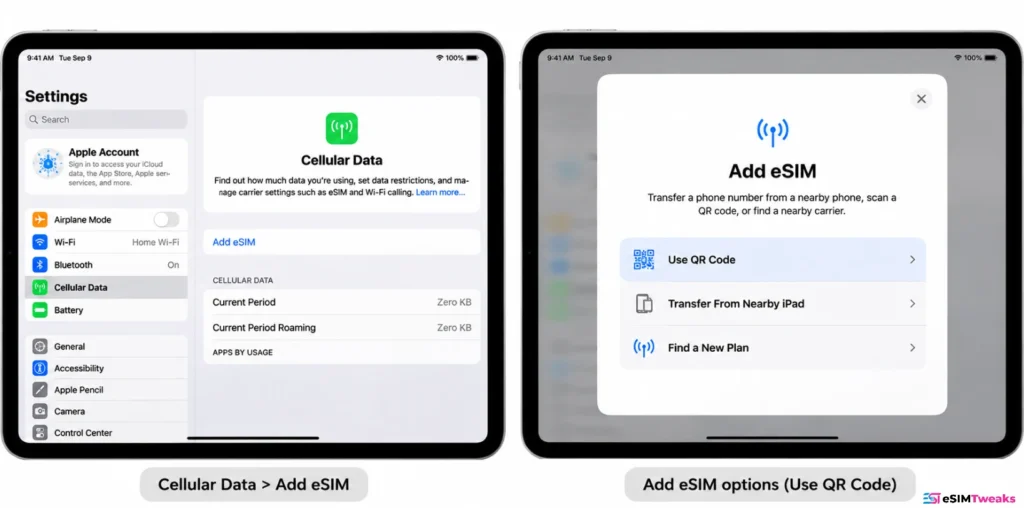
An iPad stores eight or more eSIMs and swaps which one is active, so a travel profile can sit beside a Verizon or T-Mobile tablet line all year. Every activation route is in Apple's eSIM on iPad guide, and carrier roaming is in its iPad travel notes.
Keeping your iPhone line and iPad eSIM separate
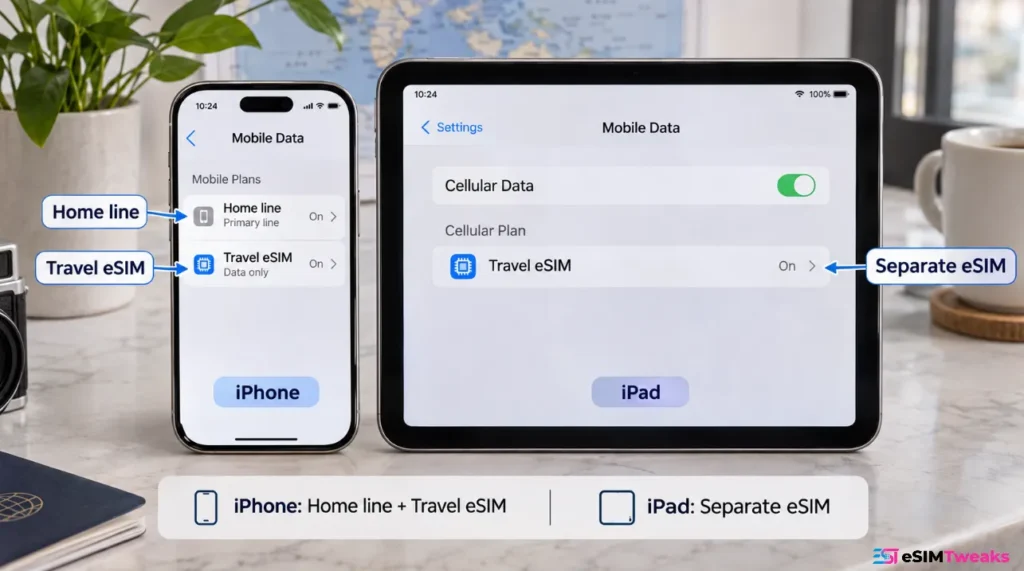
Buy one plan per device. An eSIM profile installs on one iPhone or one iPad, never both, and one plan can't be split between them. The phone keeps its home line plus its own travel eSIM.
"Join iPhone Plan" isn't a travel option. It adds the iPad to your iPhone's carrier plan, billed by that carrier. Abroad it follows the carrier's roaming rules, not travel eSIM prices.
Your iPad has no number to protect. iMessage and FaceTime ride on your Apple Account over whatever data is live, so the travel eSIM can be the only line switched on. For a two-device work kit, the eSIM work guide goes further.
iPad eSIM troubleshooting
| Symptom | Fix |
|---|---|
| No Cellular Data menu in Settings | It's a Wi-Fi-only iPad. No eSIM will install. Tether to your phone or carry a pocket hotspot |
| Can't scan the QR code on the iPad's own screen | Touch and hold the code and tap Add eSIM (iPadOS 17.4 or later), or use Enter Details Manually |
| Installed, but no data after landing | Make the travel plan the active line in Cellular Data and turn Data Roaming on for it |
| Home tablet line charging roaming | Your carrier line is still active. Switch the active plan to the travel eSIM |
| Data slows to a crawl by mid-afternoon | You've used the daily full-speed allowance on an unlimited plan. It resets within 24 hours |
| "Cellular plan cannot be added" | The iPad may be carrier-locked. Ask the carrier to lift the lock, then retry on stable Wi-Fi |
| Deleted the eSIM by mistake | Most travel profiles can't be reinstalled. Contact the provider before buying a new one |
eSIM for iPad: FAQs
Short answers to what people ask before putting a plan on a tablet.
What iPads have eSIM?
Every Wi-Fi + Cellular iPad from the iPad 7th generation, iPad Air 3rd generation, iPad mini 5th generation and 2018 iPad Pro onward. The iPad (A16), iPad mini (A17 Pro) iPad Air (M2 and later) and iPad Pro (M4 and later) are eSIM only, with no SIM tray. Wi-Fi-only models have none.
Does the iPad 11th gen support eSIM?
Yes, on the Wi-Fi + Cellular version. The iPad 11th generation is the model Apple calls iPad (A16), and its cellular version is eSIM only, with no nano-SIM tray. Any travel eSIM in this guide installs on it. The Wi-Fi-only iPad (A16) has no cellular radio, so it can't take one.
Can I add an eSIM to any iPad?
No, only to Wi-Fi + Cellular models from the 2018 iPad Pro onward. The eSIM needs a cellular modem, which Wi-Fi-only iPads lack, and no update adds one. Older cellular iPads take a nano-SIM instead. If Settings shows a Cellular Data menu, your iPad qualifies, and any data plan in this guide will install.
Can I buy an eSIM for my iPad?
Yes. All seven providers in this guide sell iPad-ready data plans you buy online and install by QR code, app or manual code. At home, Verizon and T-Mobile add tablet lines to phone accounts, and AT&T sells a $3 day pass inside Settings > Cellular Data.
How can I get a free eSIM for my iPad?
A few free options exist. AT&T makes each customer's first Unlimited Day Pass free, for one iPad, with no AT&T account needed. Nomad gives new users a free 1GB trial eSIM. Holafly adds 1GB of backup data every 30 days to any of its eSIMs that stays installed. None replaces a paid plan for a real trip.
Does an iPad eSIM come with a phone number?
No. Every travel plan in this guide is data-only, and an iPad can't make cellular calls or receive texts on its own line anyway. FaceTime, iMessage and WhatsApp calls all work over data through your accounts, so paying extra for a number makes no sense on a tablet.
What is the cheapest eSIM for iPad?
In Japan, aloSIM's 50GB plans are the cheapest per gigabyte with ESIMTWEAKS: $23.38 for 10 days ($0.47/GB) or 29.33for30days(0.59). For a one-off 10GB or 20GB month, Nomad is cheapest at $13.60 and $19.55 with ESIMDUDE15. For unlimited, Maya Mobile costs $17.99 for 7 days with ESIMTWEAKS10. At home in the US, AT&T's day pass is $3.
Can I use the same eSIM on my iPhone and iPad?
No. An eSIM profile installs on one device, and a single plan can't run on two at once. Buy a second plan for the iPad, or tether it to the phone and live with the phone plan's sharing limits. Holafly, for example, caps sharing at 1GB a day.
The verdict
The best eSIM for iPad for most trips is Nomad: 20GB over 30 days in Japan for $19.55 with ESIMDUDE15.
aloSIM wins for heavy use at $29.33 for 50GB, and Maya Mobile is the cheapest unlimited at $17.99 a week.
Check for the Cellular Data menu, buy the cheapest data you trust, and install it the night before. More picks: eSIM for Japan, the Japan eSIM price comparison and the full provider comparison.
Itterasshai, as Japanese hosts say when you head out: go well, and come back.
Why trust eSIMTweaks.
59 providers tested.
388 speed tests run.
20 countries covered.
More like this






About the author

Ali has bought the wrong eSIM in enough airports to make it a personal mission that you don't. He handles reviews and price-tracking at eSIMTweaks — catching providers who quietly charge triple for the same gigabyte and pulling coupon codes the second they stop working. He trusts a speed test over a marketing deck and a live price over a five-star badge, every time.