Saily eSIM Not Working? App-Specific Fixes That Work
October 8, 2026

Saily
Saily, from the NordVPN team, offers generous data packages for travellers, including a standout unlimited tier with 5GB daily at full speed. Fixed plans are competitively priced, and the unlimited option provides excellent value for heavy data users.
Pros
- 5GB daily at full speed
- 1,024 kbps after cap
- 20GB at $16.99 is fair
- Plans start on arrival
Cons
- $71.99 for a month of unlimited is pricey
- No named host network
- No Israeli number on any tier
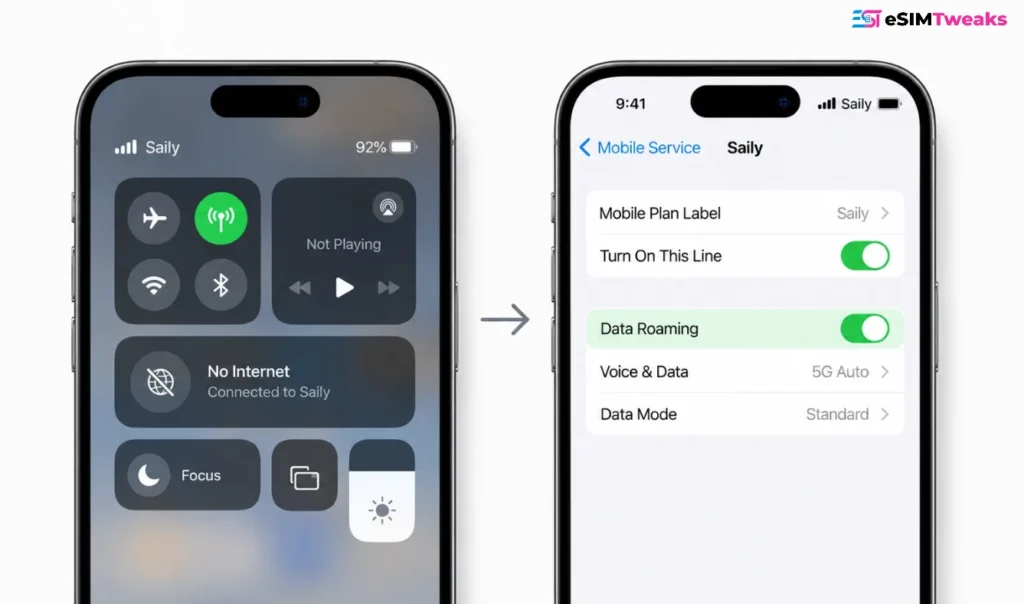
If your Saily eSIM shows signal bars but no internet, turn on Data Roaming for the Saily line specifically. It is off by default. That single toggle fixes most cases.
If it does not, the second most likely cause is a missing APN, and the value you need is wbdata.
This guide covers Saily eSIM not working on iPhone, Android and Samsung, plus what to do when it stops working abroad or after a software update.
Everything below is ordered by how often it actually turns out to be the problem.
Start at the top and work down. Do not skip to the bottom because a forum post told you to reset your network settings, because that step wipes the two things you are about to configure.

How to fix Saily eSIM not working: the fast triage list?
Nine steps, in order. Most people are back online by step four.
| Fix | Where it lives |
|---|---|
| Turn Wi-Fi off | Quick settings |
| Enable the line, select it for data | iOS Mobile Service · Samsung SIM Manager · Pixel SIMs |
| Data Roaming on | Per line, in cellular data settings |
| APN = wbdata | APN settings, both Name and APN fields |
| Disable 5G | Preferred network type · Voice & Data |
| Airplane mode, 15 seconds | Quick settings |
| Restart the phone | Power buttons |
| Manual network selection | Network Operators · Network Selection |
| Reset network settings, then redo 3 and 4 | System reset options |
Step nine is last for a reason. A network settings reset erases your APN and switches roaming back off.
If you do it first, you undo your own work and end up more confused than when you started.
Fix 1: Turn Wi-Fi off first
Sounds stupid. It is not.
Wi-Fi masks a dead eSIM. Your apps keep working, the phone shows a connection, and you spend twenty minutes convinced the eSIM is fine when it has never actually attached to a network.
Saily’s own troubleshooting docs list this as step one on every platform.
Turn Wi-Fi off. Now you know whether the eSIM works.
Fix 2: Check the line is actually on and selected
Installing an eSIM does not switch it on. Two separate things.
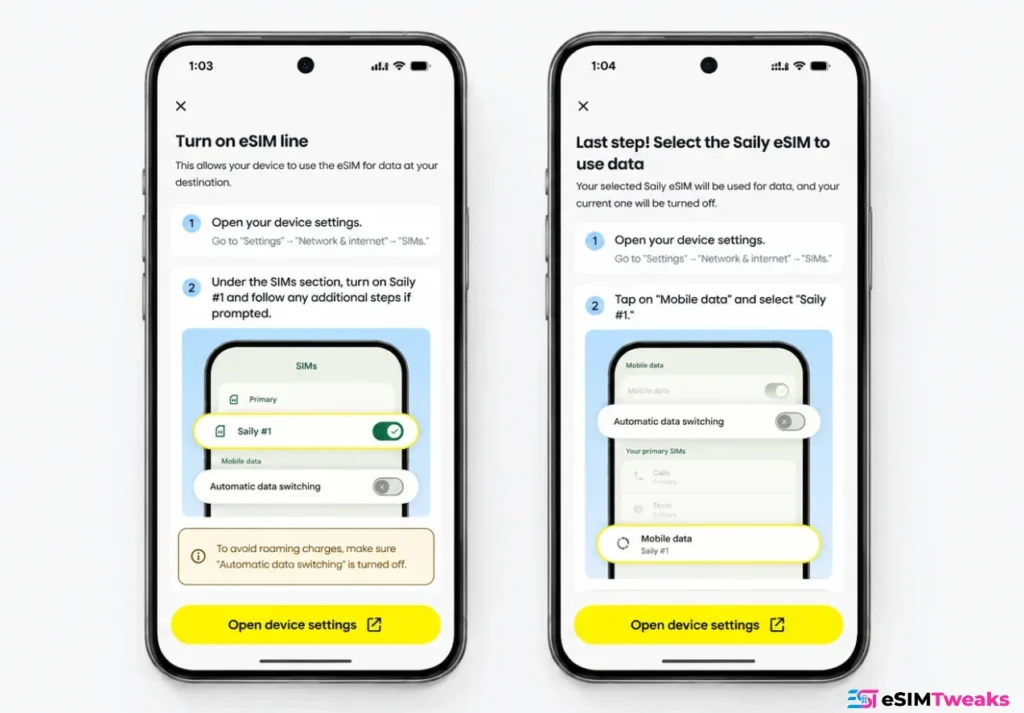
iPhone: Settings > Mobile Service > tap your Saily eSIM > make sure Turn On This Line is enabled. Then go back to Mobile Service > Mobile Data > select the Saily eSIM.
Samsung: Settings > Connections > SIM Manager > enable the eSIM toggle. Then SIM Manager > Mobile Data > select Saily.
Google Pixel: Settings > Network and internet > SIMs > select the eSIM > toggle Use SIM on, then Mobile data on.
Saily also recommends disabling your home SIM once you land.
Two reasons: it stops your normal carrier quietly billing you for roaming, and it removes a source of conflict when the phone is deciding which line to use for data.
Keep the home line installed if you need SMS codes, just switch its data off.
Fix 3: Data Roaming is off by default. Turn it on.
This is the one. If you read nothing else on this page, read this.
Saily lines ship with roaming disabled, and the phone will show full signal bars while passing no traffic at all. It looks exactly like a broken eSIM.
iPhone: Settings > Mobile Service > your Saily eSIM > toggle Data Roaming to ON.
Samsung: Settings > Connections > Mobile Networks > toggle Data Roaming on.
Google Pixel: Settings > Network and internet > SIMs > select the eSIM > toggle Roaming on.
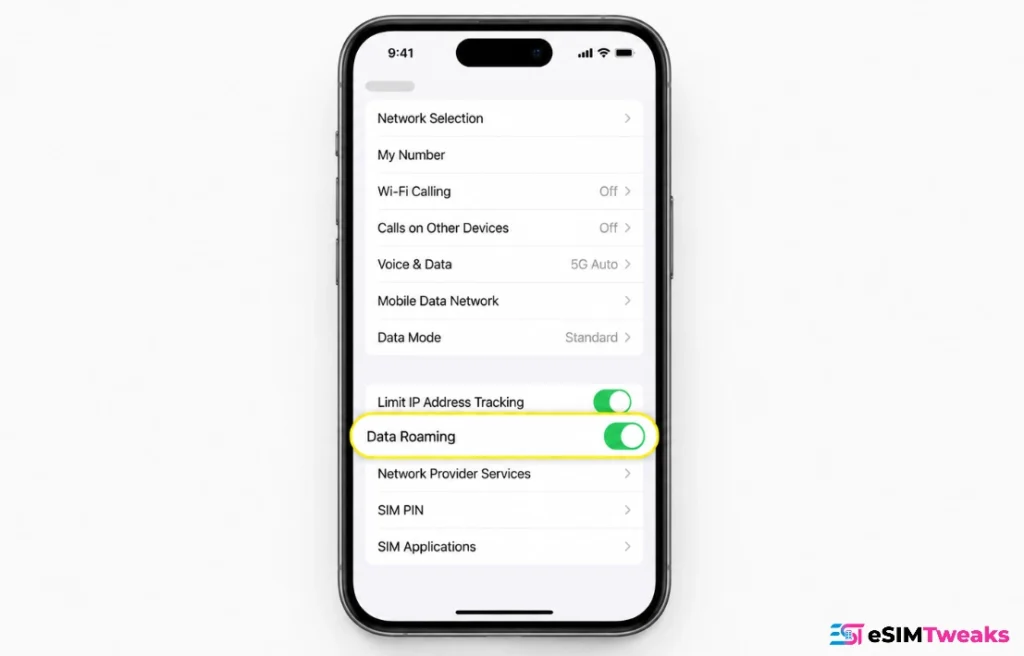
Roaming is a per line setting in the cellular data settings on both platforms, so turning it on for Saily does not turn it on for your home carrier and will not trigger international roaming charges on your normal number. That is the whole point. Your home line stays locked down while the travel line does the work.
Fix 4: Set the APN to wbdata
If roaming is on and you still have nothing, the profile did not pull an APN. Every travel eSIM is a prepaid data plan riding a partner network, and without APN settings the phone has no route to send traffic.
The value is wbdata. Put it in both the Name field and the APN field. Leave every other field blank.
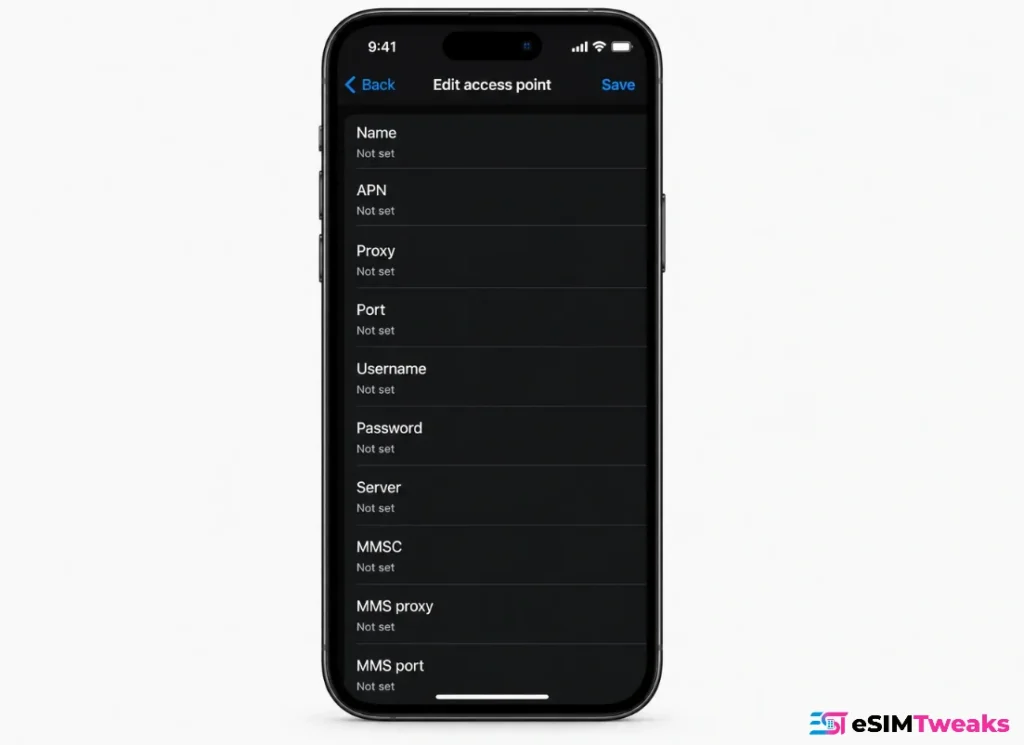
Most guides online still list truphone.com, which is the old value from an earlier plan generation. Saily’s current documentation says wbdata across all three platform articles, and there is no evidence it varies by destination.
Samsung: Settings > Connections > Mobile Networks > Access Point Names > tap + > Name wbdata, APN wbdata > Save > then select the radio button next to it.
Google Pixel: Settings > Network and internet > SIMs > select the eSIM > Access point names > add new > Name wbdata, APN wbdata > Save > select it.
iPhone: Settings > Mobile Service > your Saily eSIM > Mobile Data Network > enter wbdata in the APN field under both Mobile Data and LTE Setup.
Two things people get wrong here. Saving an APN does not activate it, you have to select it afterwards. And on iPhone, Saily admits some handsets hide the APN menu entirely, in which case this fix is not available to you and you should move to the next one.
Fix 5: Turn off 5G
Saily lists “disable 5G” as a standard troubleshooting step on iPhone, Samsung and Pixel. When a provider recommends switching off a headline feature on every platform they support, that tells you the 5G registration problem is systemic rather than a quirk of your handset.
What happens is the visited network and the roaming profile fail to negotiate a 5G session cleanly, and you end up attached but carrying no traffic.
Pixel: Settings > Network and internet > SIMs > eSIM > Preferred network type > choose 4G or 3G.
Samsung: Settings > Connections > Mobile Networks > select the eSIM > Preferred Network Type > 4G/3G.
iPhone: Settings > Mobile Service > Saily eSIM > Voice & Data > select LTE or 4G instead of 5G.
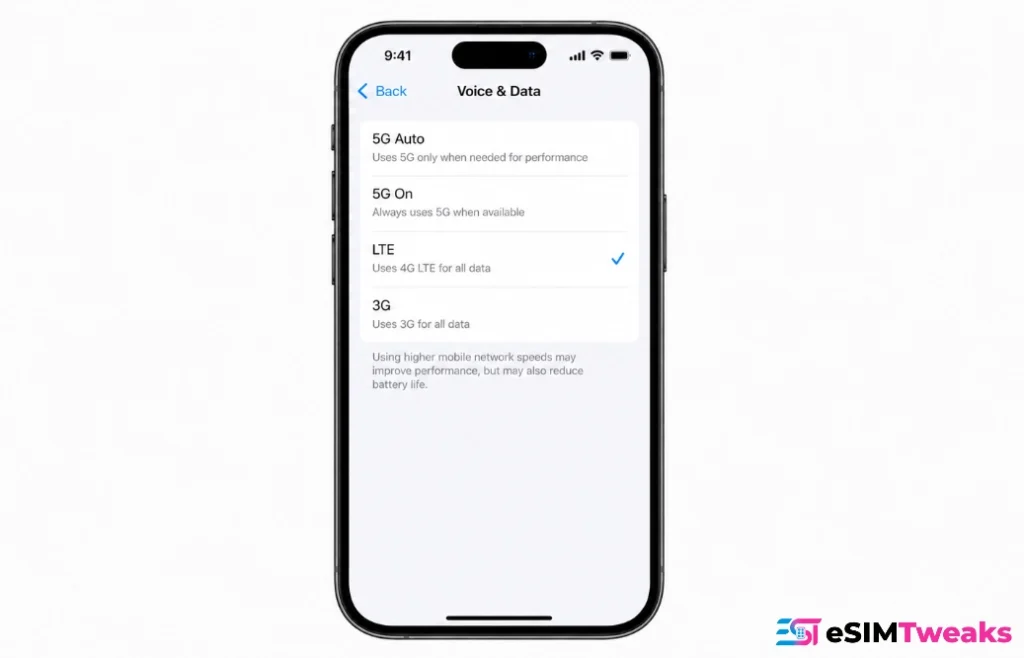
Pixel owners in Japan have reported this specifically, and the reported fix there is disabling 5G and turning off Adaptive Connectivity in Settings > Network and internet. If you are on a Pixel, our full Pixel eSIM walkthrough covers the Adaptive Connectivity toggles in more detail.
Fix 6: Airplane mode, but do it properly
Fifteen seconds. Saily specifies fifteen seconds on every platform, not the two second flick most people do.
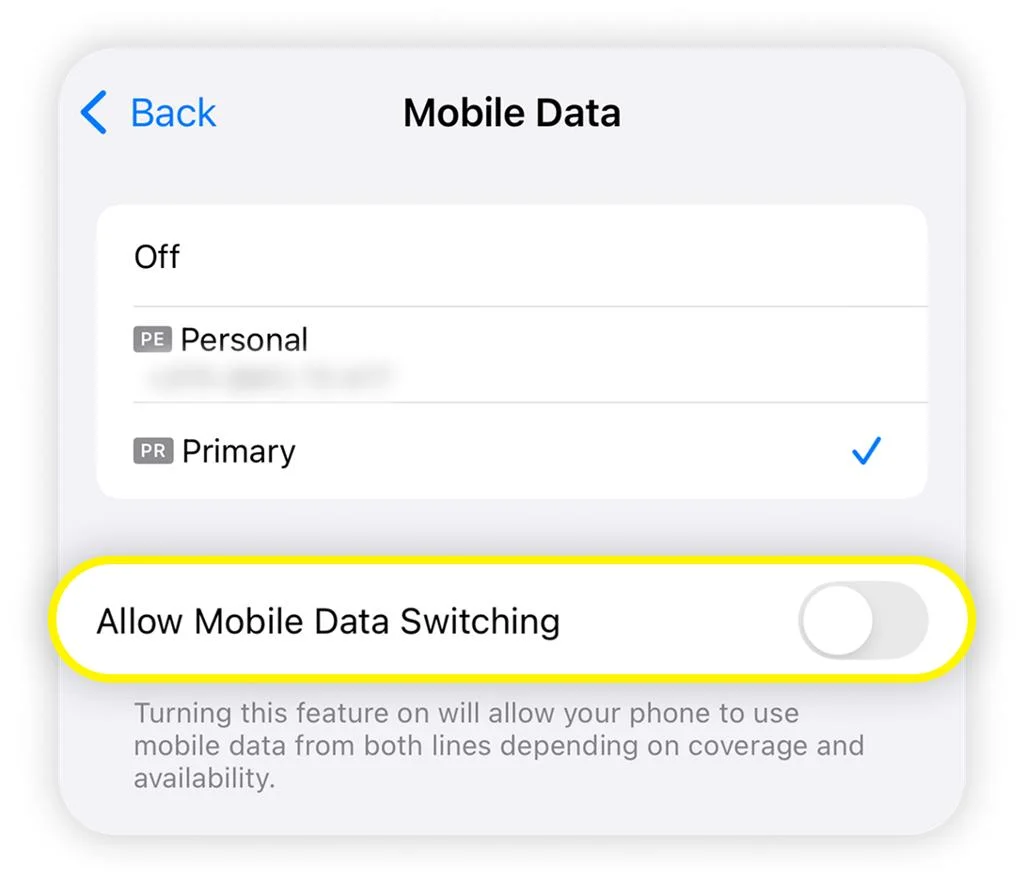
The delay matters because the radio needs time to fully deregister from the network before it tries again. Flick it off and on quickly and the phone reattaches to the same failed session.
Fix 7: Restart the phone
Yes, it is the oldest advice in technology. It also works often enough that Saily puts it in their own docs.
Fix 8: Pick the network manually
Automatic network selection sometimes locks onto a partner network that is registered but not passing data. Overriding it by hand is a documented Saily step.
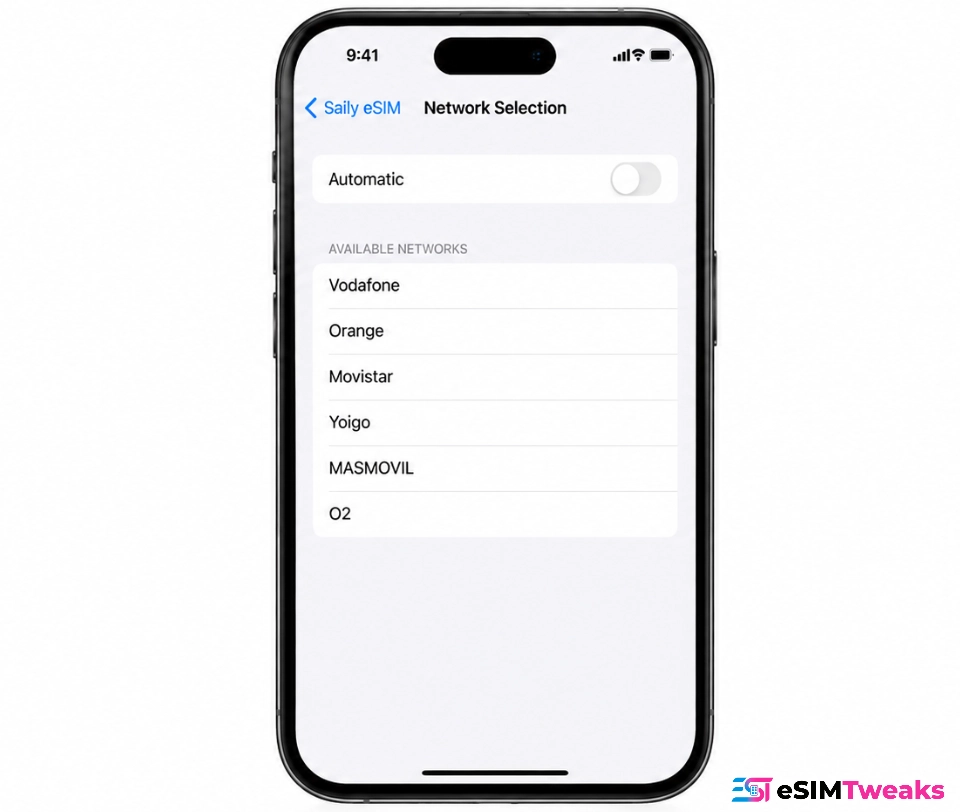
Give each operator one to two minutes to attach before you try the next one in the list. Users report needing this most often in Vietnam, though Saily does not publish which countries are affected.
Fix 9: Reset network settings, last
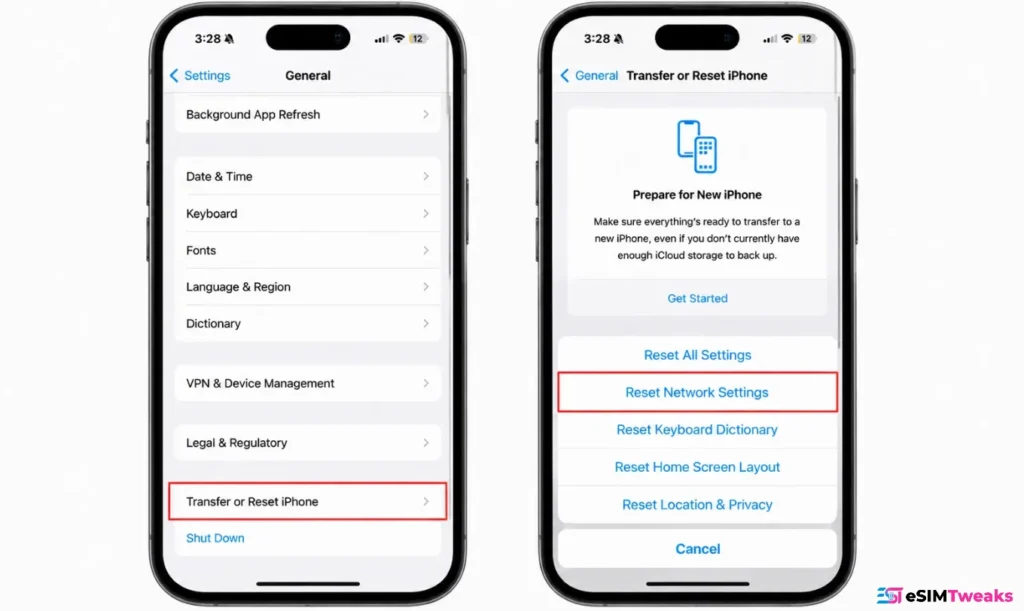
Only now. And know what it costs you.
A network settings reset wipes your APN and switches Data Roaming back off. Saily flags this explicitly. After the reset you must go back and redo Fix 3 and Fix 4 or you will be in exactly the same position, minus your saved Wi-Fi passwords.
On iPhone: Settings > General > Transfer or Reset iPhone > Reset > Reset Network Settings. On Android: Settings > System > Reset options > Reset mobile network settings.
If none of that worked
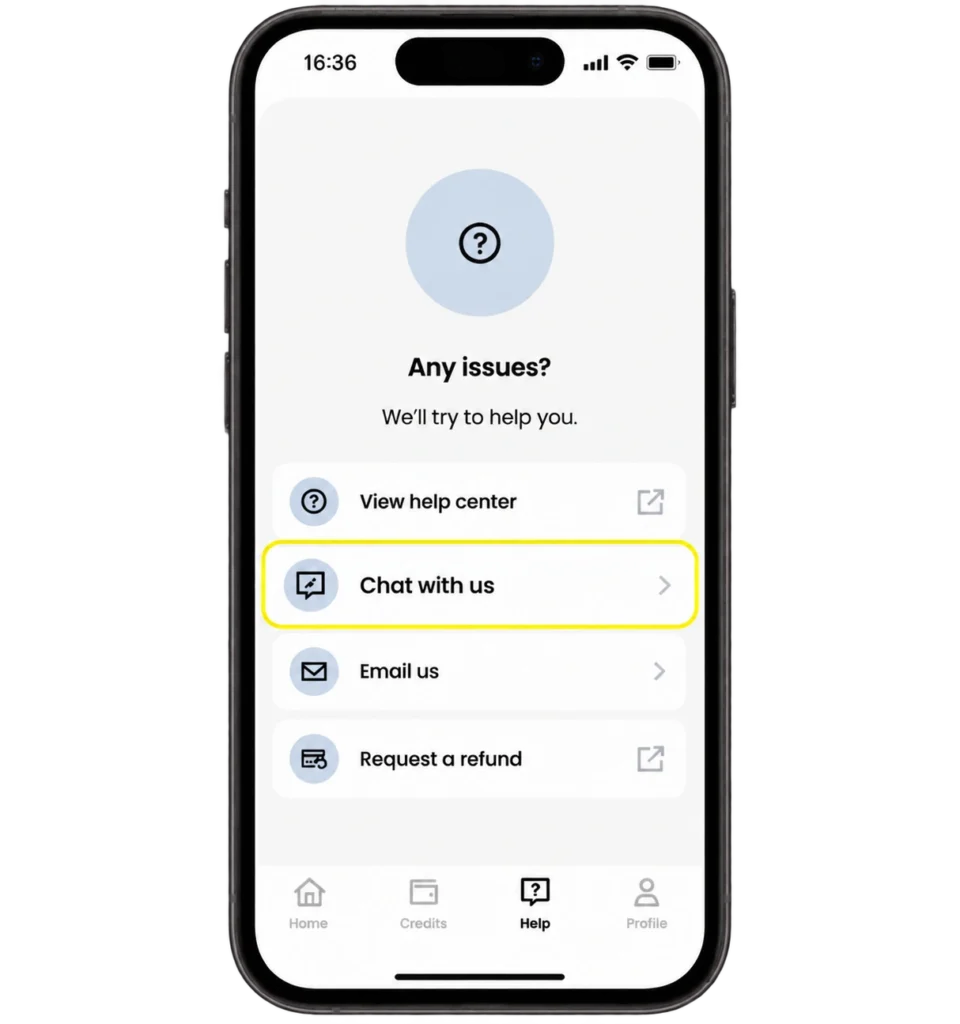
Saily runs 24/7 live chat and email. No phone support, and no phone support is coming.
The live chat only works inside the Saily app. The web support centre just shows you a QR code that sends you back to the app. Which is a problem when the reason you need support is that you have no data. Find Wi-Fi first, at a hotel, a café or the airport, then open the app.
When you message them, have this ready because they will ask for all of it: your destination and where you are right now, your phone model, the exact error on screen, whether roaming is on, and confirmation that Saily is selected for mobile data. If they ask for your EID or ICCID, both sit under your device’s SIM status screen.
One reviewer reached a human in one to two minutes through in-app chat, which is genuinely the fastest response time in this category. Support is the thing Saily is actually good at.
What Saily will not tell you?
If your eSIM never installed or activated, you have 30 days for a full refund. Once it is activated, Saily considers a refund only if the data is “mostly unused”, which their policy defines as more than 99% unused.
Work through nine troubleshooting steps and you may well burn past that line while trying to fix a plan you are about to ask them to refund. Submit through the auto-refund centre on saily.com if you get there.
It starts automatically when you arrive at the destination, not when you buy. So install before you fly, but do not switch the line on early.
Turkey’s regulator BTK blocked Saily in country on 10 July 2025. You cannot buy a plan or top up while you are physically in Turkey without a VPN. If Turkey is on your itinerary, buy and install before you land. This one catches people out badly, and no amount of troubleshooting will fix it.
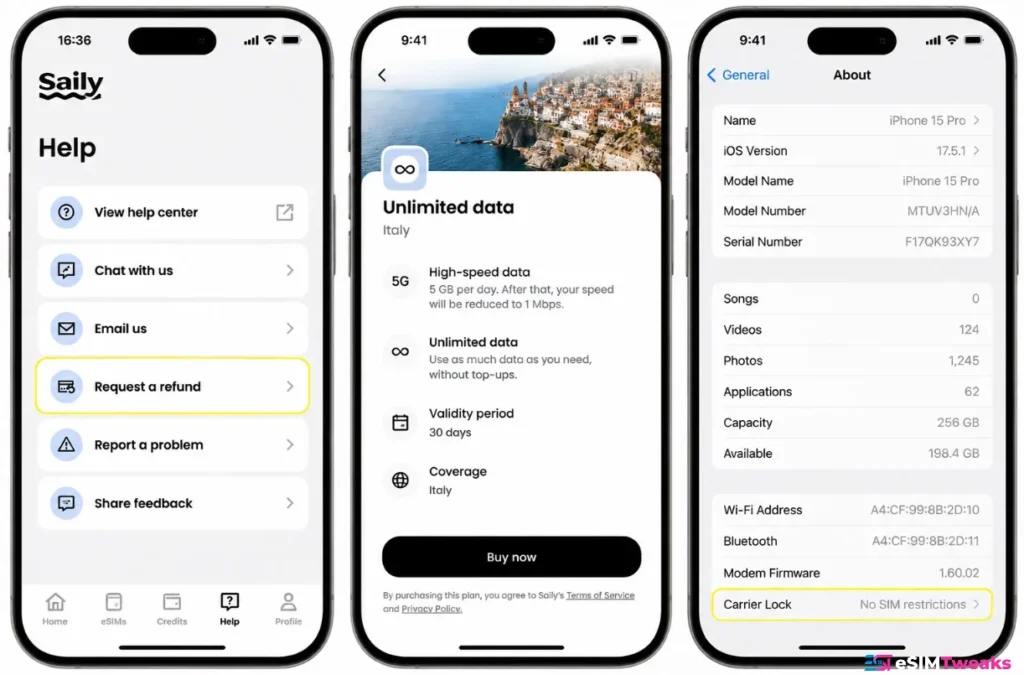
Saily’s own wording: “Each user with an unlimited eSIM plan gets 5 GB of full-speed data every 24 hours”, and past that, “your speed will be reduced to 1Mbps or less until the period resets.” That is a flat 5GB globally, not 3GB in Europe as several review sites claim.
Tethering is uncapped but counts against the same 5GB. If your connection went slow rather than dead, you have probably hit the cap and nothing above will help.
A carrier locked phone will never work. Saily is direct about it: “You won’t be able to use an eSIM on your device if it is locked by your carrier.”
Check on iPhone at Settings > General > About and look for SIM lock. On Android, check whether Add eSIM even appears in SIM manager.
When to stop troubleshooting and switch?
If you have worked through all nine steps, cleared support, and you are still offline in a country where Saily’s roaming partner is simply weak, the fix is a different eSIM rather than more settings.
Sensible fallbacks depending on where you are:
Airalo has the widest country list and holds genuinely local profiles in South Korea, Thailand and the Maldives rather than roaming agreements.
Nomad names its carrier partner on every destination page, so you can check before buying whether you would be landing on the same network that just failed you.
MobiMatter sells plans from more than 30 vendors, so if one partner network is the problem in your location you can pick a different one without leaving the checkout.
Buying a second cheap travel eSIM costs less than a single day of carrier roaming, and having two prepaid data plans installed means mobile data abroad is never a single point of failure.
Sometimes that is the answer.
Exclusive Saily deal
Saily Coupon Code
Use code ESIMDUDE to save 10% on eligible standard Saily eSIM plans, regional bundles, global plans and unlimited plans.
- Standard plans
- Regional & global
- Unlimited plans
- New & existing users
- Verified deal
Saily’s unlimited plan is the most generous on this page, offering 5GB daily at full speed before throttling, making it ideal for data-hungry travellers. Despite the high monthly price, the value per gigabyte is exceptional.
Frequently asked questions
Why is my Saily eSIM not working when I have full signal?
Data roaming is off. Saily lines ship with roaming disabled, so the phone attaches to a network and shows bars while passing no data. Turn Data Roaming on for the Saily line specifically, not for your home line.
Whatis the APN for Saily?
wbdata. Enter it in both the Name field and the APN field and leave everything else blank. Older guides list truphone.com, which has been superseded.
Why does Saily tell me to turn off 5G?
Because 5G registration fails with roaming profiles on some visited networks. Saily lists disabling 5G as a standard step on iPhone, Samsung and Pixel, which suggests it is a known systemic issue rather than a device fault.
Saily eSIM not working on iPhone, what do I check first?
Settings > Mobile Service > your Saily eSIM. Confirm Turn On This Line is enabled, Data Roaming is on, and the line is selected under Mobile Data. Then set Voice & Data to LTE instead of 5G.
Saily eSIM not working on Android or Samsung?
Check the eSIM is enabled in SIM Manager and selected for mobile data, turn on Data Roaming under Mobile Networks, then add an APN with wbdata in both fields and select it.
Does resetting network settings fix Saily?
Sometimes, but do it last. The reset erases your APN and turns Data Roaming back off, so you have to redo both afterwards or you end up worse off.
Saily eSIM not working after a software update?
An iOS or Android update can clear your APN and reset roaming. Re-enter wbdata in the APN settings and switch Data Roaming back on for the Saily line. Saily publishes no update specific guidance, so the generic path is reset network settings then reconfigure both.
Saily eSIM not working abroad but fine at home?
That is expected. A travel eSIM only activates when it reaches its destination network, and roaming must be enabled for the line. If it worked at home you were almost certainly on Wi-Fi.
Saily eSIM not working, Reddit says to reset everything. Should I?
The recurring themes match Saily’s own documentation: roaming off by default, missing APN, and 5G handshake failures on Pixel. The fixes in this guide address all three.
Why did my Saily eSIM stop working in Turkey?
Saily’s app has been blocked in Turkey by the regulator since July 2025. You cannot purchase or top up while inside the country without a VPN. Buy and install before you arrive.
My Saily data got slow rather than stopping. What happened?
You have most likely hit the fair use limit. Unlimited plans give 5GB of full speed data per 24 hours, then drop to 1Mbps or less until the period resets. Hotspot use counts toward the same allowance.
Can I get a refund if my Saily eSIM never worked?
If it was never installed or activated, yes, within 30 days. If it was activated, Saily considers refunds only when more than 99% of the data is unused, so extended troubleshooting can disqualify you.
How do I contact Saily support with no data?
Live chat is inside the Saily app only, so you need Wi-Fi. Email is the alternative. There is no phone support.
Saily
Saily, from the NordVPN team, offers generous data packages for travellers, including a standout unlimited tier with 5GB daily at full speed. Fixed plans are competitively priced, and the unlimited option provides excellent value for heavy data users.
- 4G/5G
- 4G/5G
- Hotspot
- No
- Calls
- No
- Discount
- 10% OFF with ESIMDUDE with code ESIMDUDE
Saily plans & prices
| eSIM | Country | Data | Validity | Price | Price/GB | Price/Day | Code | |
|---|---|---|---|---|---|---|---|---|
| Saily |
BG | 1 GB | 7 Days | $1.99 | $1.99/GB | $0.28/day | 10% OFF with ESIMDUDE | Get Deal |
| Saily |
CZ | 1 GB | 7 Days | $2.99 | $2.99/GB | $0.43/day | 10% OFF with ESIMDUDE | Get Deal |
| Saily |
YT | 1 GB | 7 Days | $2.99 | $2.99/GB | $0.43/day | 10% OFF with ESIMDUDE | Get Deal |
| Saily |
TH | 1 GB | 7 Days | $2.99 | $2.99/GB | $0.43/day | 10% OFF with ESIMDUDE | Get Deal |
| Saily |
PR | 1 GB | 7 Days | $3.99 | $3.99/GB | $0.57/day | 10% OFF with ESIMDUDE | Get Deal |
| Saily |
US | 1 GB | 7 Days | $3.99 | $3.99/GB | $0.57/day | 10% OFF with ESIMDUDE | Get Deal |
| Saily |
RE | 1 GB | 7 Days | $3.99 | $3.99/GB | $0.57/day | 10% OFF with ESIMDUDE | Get Deal |
| Saily |
UA | 1 GB | 7 Days | $3.99 | $3.99/GB | $0.57/day | 10% OFF with ESIMDUDE | Get Deal |
| Saily |
VI | 1 GB | 7 Days | $3.99 | $3.99/GB | $0.57/day | 10% OFF with ESIMDUDE | Get Deal |
| Saily |
SE | 1 GB | 7 Days | $3.99 | $3.99/GB | $0.57/day | 10% OFF with ESIMDUDE | Get Deal |
› Every provider listed here has been personally tested and works, based on our own experience. ‹
Last data update: 13th October 2026
Converted from USD at the reference rate of 2026-10-15. Providers bill in their own currency, so your card statement may differ slightly.
Why trust eSIMTweaks.
59 providers tested.
388 speed tests run.
20 countries covered.
More like this
About the author

Editor-in-Chief
As Editor-in-Chief, I am responsible for our editorial standards, review methodology and the final approval of every provider ranking published on eSIMTweaks. I have spent fifteen years in travel and consumer technology publishing. Our team purchases the plans it evaluates, and commercial partnerships have no influence on placement.